Drawing a black box over a social security number does not remove it. The digits are still in the file, and anyone can copy them out. Real redaction deletes what is underneath. That is what Redact in PDF Keel Pro will do.
How to redact with PDF Keel
- Open the PDF. Today you can already sign, fill and rearrange it for free.
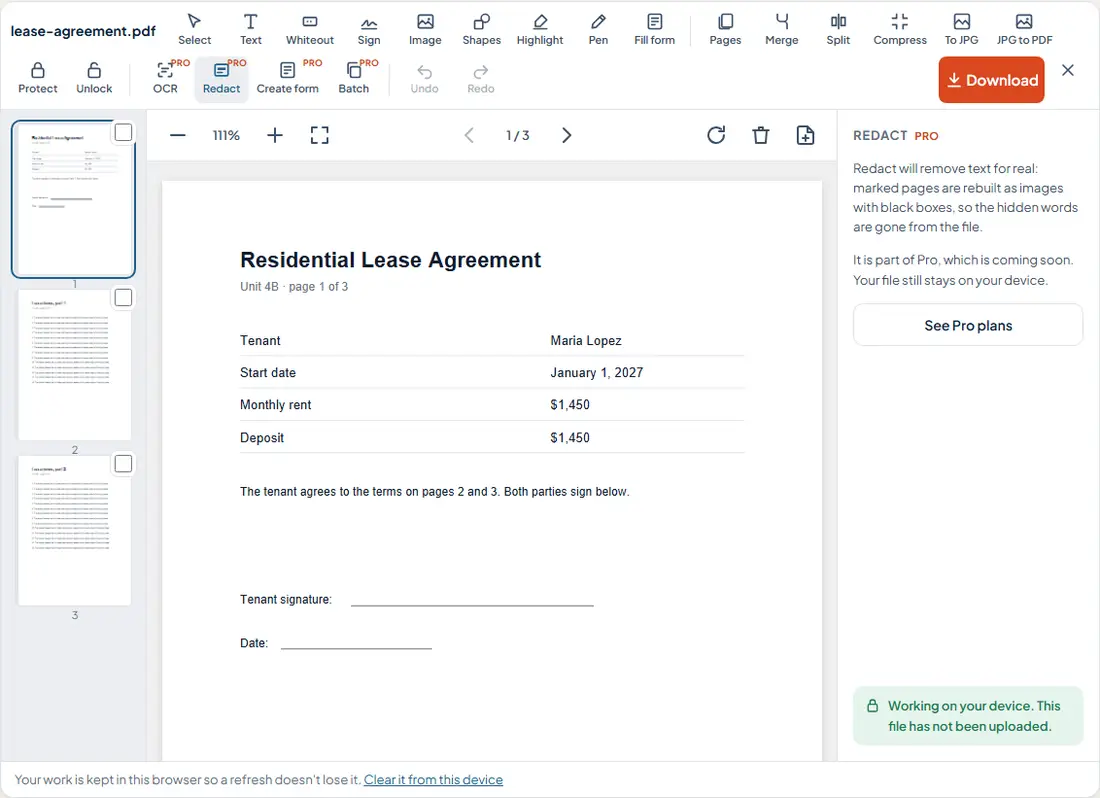
- Pick Redact in the toolbar to see what is planned. It is marked PRO.
- When it ships, you will mark the areas to hide, then apply.
- Each marked page will be rebuilt as an image with solid black boxes, so the hidden words are gone from the file.
- An optional text layer will keep the rest of the page searchable.
What it can't do
Redact is not available yet. The free Whiteout tool only covers text and must not be used to hide private details. Rebuilt pages will lose selectable text unless you keep the optional OCR layer.
Tip
Before sharing any file with private details today, check it: open it, press Ctrl+A, copy, and paste into a note. Anything that shows up there is still in the file.
Questions
Why not just cover the text?
Covering only changes what you see. The original characters stay in the file and can be extracted in seconds.
Will my file be uploaded for redaction?
No. Redaction will run on your device too.
Is Redact part of the free plan?
No. It is a Pro tool. Pro is coming soon.