Email services often reject attachments over 20 or 25 MB. Compress makes a PDF smaller on your device and shows the true size before and after, measured in bytes, not guessed.
How to compress with PDF Keel
- Open the PDF.
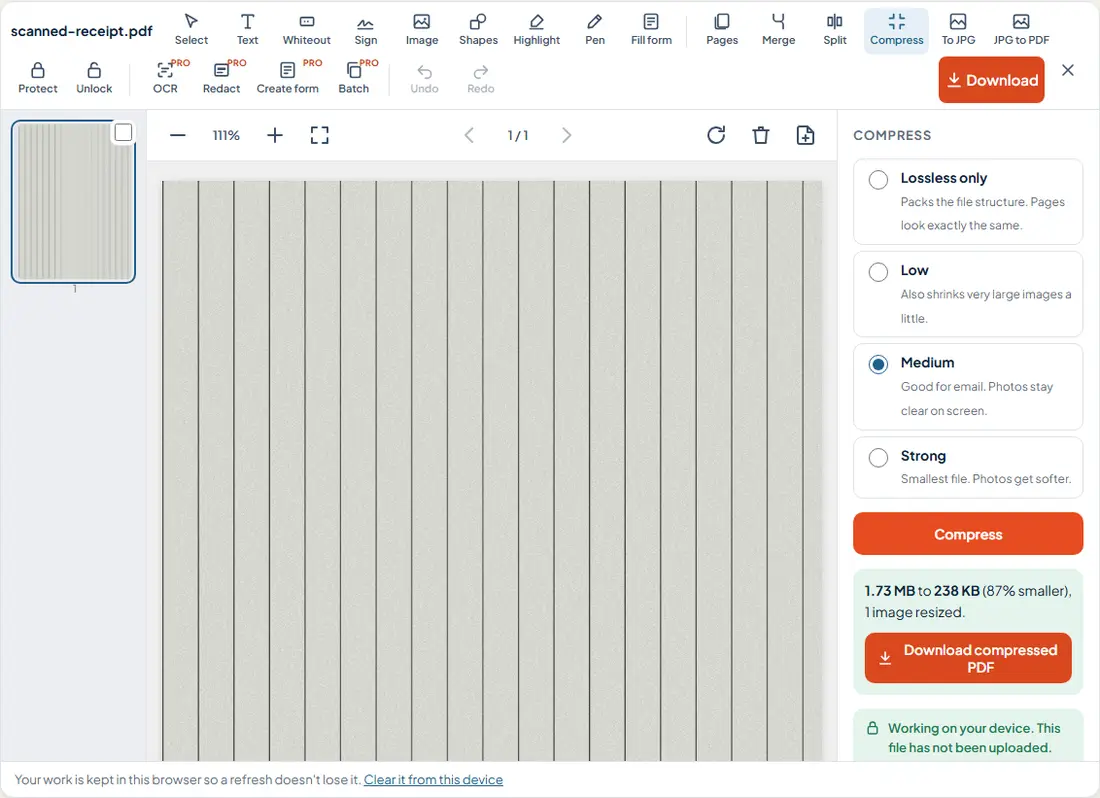
- Choose a level. Lossless only repacks the file structure and keeps every pixel. Low, Medium and Strong also shrink large photos inside the file.
- Press Compress and wait for the sizes to appear.
- Check the result line, for example 1.73 MB to 238 KB.
- Press Download compressed PDF.
What it can't do
A file that is mostly text is usually small already, so the saving may be tiny. If the compressed copy is not smaller, you get the original back and the panel says so. Compress does not remove pages, fonts or metadata, and it cannot shrink some image types, such as JBIG2 or CMYK photos.
Tip
Start with Medium. If the photos look too soft after downloading, run it again on the original file with Low.
Questions
Will the text get blurry?
No. Only photos and scans are resized. Text and drawn shapes stay sharp at every level.
Why is my scan so big?
Scanners often save each page as a very large image. Medium resizes those to a size that still reads well on screen.
Is the original file changed?
No. You download a new copy and the original stays as it was.